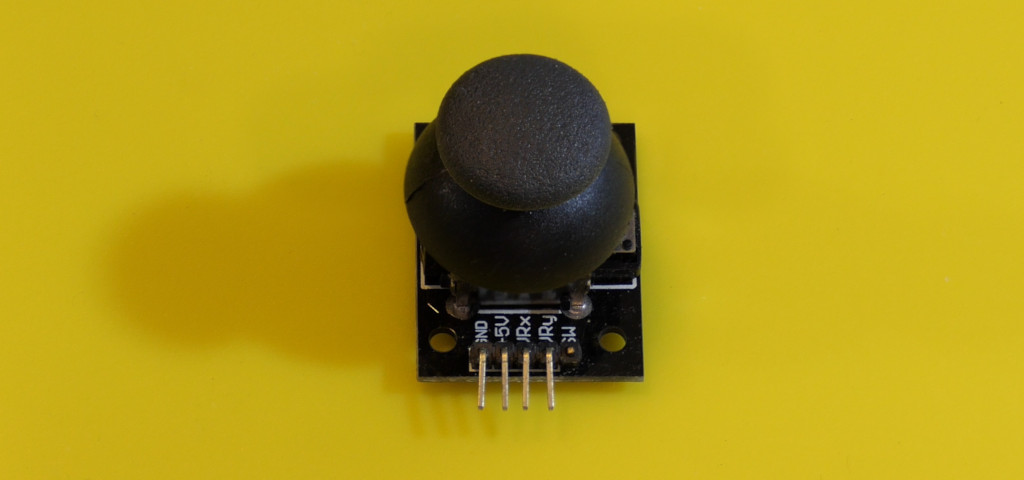
A joystick combines two potentiometers arranged at right angles, often with a pushbutton. It is useful for a small pan/tilt controller, a menu, or a one-handed input device. The first task is to turn its imperfect resting position into a reliable “do nothing” command.
Connect the module
| Connection | Destination or purpose |
|---|---|
| Supply / GND | 5 V / GND for this Uno example. |
| VRx / VRy | A0 / A1. |
| SW | D2, configured with INPUT_PULLUP. |
On a 3.3 V-only controller, power a compatible potentiometer module from 3.3 V so its analog outputs stay in range. A digital logic-level converter is not generally the right way to scale a continuously varying analog voltage.
Calibrate and read
Download the complete Arduino sketch
const byte xPin = A0, yPin = A1, buttonPin = 2;
int centerX = 512, centerY = 512;
const int deadZone = 35;
unsigned long reportedAt = 0;

int axisValue(int raw, int center) {
  const int offset = raw - center;
  if (abs(offset) <= deadZone) return 0;
  if (offset > 0) {
    return constrain(map(raw, center + deadZone, 1023, 0, 100), 0, 100);
  }
  return constrain(map(raw, 0, center - deadZone, -100, 0), -100, 0);
}

void setup() {
  pinMode(buttonPin, INPUT_PULLUP);
  Serial.begin(9600);
  Serial.println("Release the stick; center calibration starts in 2 seconds");
  delay(2000);
  long xSum = 0, ySum = 0;
  for (byte i = 0; i < 64; ++i) {
    xSum += analogRead(xPin); ySum += analogRead(yPin); delay(5);
  }
  centerX = constrain(xSum / 64, deadZone + 1, 1022 - deadZone);
  centerY = constrain(ySum / 64, deadZone + 1, 1022 - deadZone);
}

void loop() {
  const unsigned long now = millis();
  if (now - reportedAt < 100) return;
  reportedAt = now;
  Serial.print("x="); Serial.print(axisValue(analogRead(xPin), centerX));
  Serial.print(" y="); Serial.print(axisValue(analogRead(yPin), centerY));
  Serial.print(" pressed="); Serial.println(digitalRead(buttonPin) == LOW ? 1 : 0);
}
Open Serial Monitor at 9600 baud and release the stick during startup. After a two-second pause the sketch averages 64 samples to estimate its center. Opening Serial Monitor may reset an Uno and restart this calibration. The displayed axes range approximately from −100 to 100, with zero in a dead zone around the measured center. The switch reports 1 while pressed.
Center is a midpoint, not zero volts
On an ideal 5 V joystick, the resting wiper voltage is about half the supply. On the Uno’s 10-bit ADC that is near 512. Manufacturing tolerances and spring position shift it, so the software should measure the actual value. Trying to mechanically adjust the center to zero would defeat the useful two-sided range.
The example uses the ADC endpoints as a starting assumption. To calibrate a particular mechanism more accurately, record the minima and maxima while moving it through its full range, then use those limits in the mapping. Do not repeatedly auto-center during normal use; a held position would gradually become the new neutral.
Troubleshooting
- Drifts at rest: restart with the stick released and adjust the dead zone modestly.
- Does not reach full scale: calibrate the observed endpoints.
- Axes or direction reversed: swap the chosen analog channels or negate the mapped value in software.
- Button counts several times: the example reports a state; for discrete presses, apply debouncing.
Try commanding a servo pointer only when the stick leaves the dead zone. Return the output to a defined safe state when communication is lost. The analog input tutorial explains the underlying measurement.